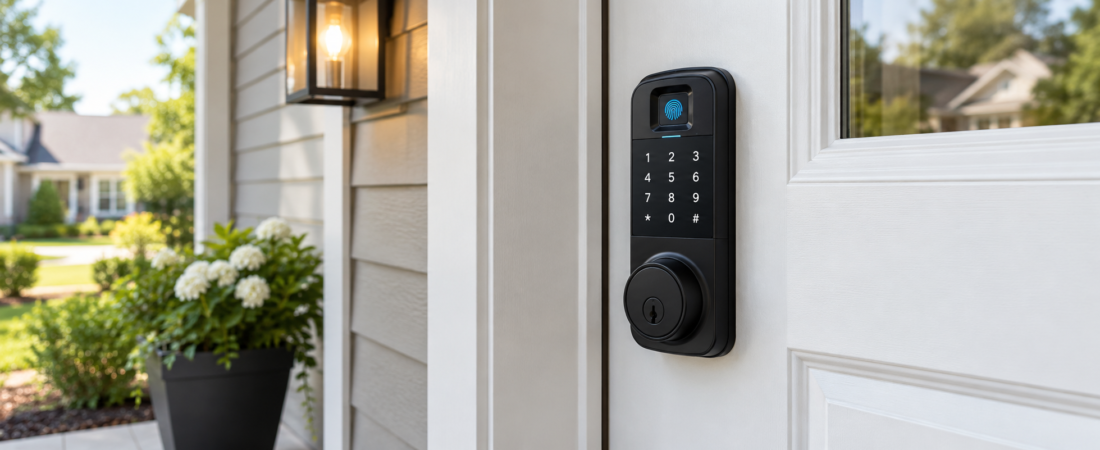
keyless entry door lock with fingerprint and keypad backup for convenient home access, better security, and reliable emergency entry. Coming home with groceries in both hands is much easier when you don’t have to search for your keys. A keyless entry door lock with fingerprint and keypad backup offers a practical solution by allowing you to unlock your door with a fingerprint or a personal PIN. If one method doesn’t work, you have another way to get inside. For homeowners across the United States, these smart locks can make everyday entry more convenient while adding useful security features. Still, not every model offers the same level of protection, reliability, or compatibility. Understanding how these locks work, which features matter, and what to check before buying can help you choose one that fits your home and your routine.
What Is a Keyless Entry Door Lock With Fingerprint and Keypad Backup?
A keyless entry door lock with fingerprint and keypad backup is an electronic door lock that lets you enter your home without using a traditional key for everyday access. It uses a fingerprint reader to recognize an enrolled finger and a keypad to accept a programmed access code. Some models also offer smartphone control, key cards, temporary guest codes, or a physical key for emergencies. The main advantage is flexibility. You can unlock the door with your fingerprint when your hands are free or enter a PIN when the sensor cannot read your finger. Depending on the model, the lock may replace your existing deadbolt or come as a complete handle-and-lock system.
How Do Fingerprint and Keypad Door Locks Work?
These locks combine electronic identification with a mechanical locking system. When you place an enrolled finger on the sensor, the lock compares the scan with stored fingerprint data and unlocks if the match meets its requirements. The keypad works differently: you enter a valid PIN, and the lock checks whether the code has permission to unlock the door. Most models run on batteries, so they can operate without household electrical wiring. More advanced locks may connect to a smartphone app through Bluetooth or Wi-Fi, although these features vary. A good design makes both entry methods straightforward without sacrificing the physical strength of the deadbolt or latch.
Why Choose a Fingerprint Door Lock With Keypad Backup?
The biggest reason to choose this type of lock is having more than one way to enter your home. Fingerprint access is quick for daily use, while a keypad provides an alternative when your hands are wet, dirty, or difficult for the sensor to recognize. This can be helpful for busy households, parents, and people who regularly arrive home carrying bags. You can also give trusted visitors individual PINs on compatible models rather than handing out spare keys. Some locks let you delete a code when a guest no longer needs access. The real benefit comes from combining convenience with sensible access management, not from assuming that every electronic lock is automatically more secure than a traditional one.
Key Features to Look for Before Buying
Reliable Fingerprint Recognition
A fingerprint reader should recognize authorized users consistently without requiring repeated attempts. Look for a model with a clear enrollment process, quick response, and a way to add or remove users. Sensor performance can vary with moisture, dirt, worn fingerprints, and temperature. If several people will use the lock, check whether it supports enough fingerprint profiles for your household. It is also worth reading independent customer reviews for recurring complaints about failed scans or slow unlocking. A fingerprint sensor is useful only when it works reliably in everyday conditions.
A Secure Keypad With a Personal PIN
The keypad is your second main entry method, so it should be easy to operate and designed to protect access codes. Look for a lock that lets you create and change PINs without complicated steps. Features such as automatic lockout after repeated incorrect attempts, temporary guest codes, and protection against casual code guessing can be valuable. Some models offer randomized keypad numbers or anti-peep entry, which lets you enter extra digits around your actual PIN. These options can make it harder for someone nearby to observe your code. Avoid simple PINs such as 1234, birthdays, or numbers you use for other accounts.
Physical Key and Emergency Power Options
Even when you prefer keyless access, a physical backup key can be useful if the electronics fail or the batteries run out. Check whether the lock includes a concealed key cylinder and keep the emergency key somewhere secure outside the locked home. Some models do not include a traditional key, so confirm this before purchasing. An external emergency power terminal, often designed for a compatible power bank, can also help when the internal batteries are depleted. This feature does not necessarily unlock the door by itself; you may still need to enter your fingerprint or PIN. Read the manufacturer’s instructions to understand exactly how emergency entry works.
Automatic Locking and Activity Alerts
Automatic locking can help if someone in your household regularly forgets to lock the door. Depending on the model, you may be able to set a delay before the deadbolt engages. Smartphone-connected locks may also send alerts when the door is unlocked or when the battery is running low. These functions are useful, but settings matter. A very short locking delay could catch someone who is still moving through the doorway, while an overly long delay may leave the entrance unsecured. Choose adjustable settings and test them carefully after installation.
Smartphone Connectivity and Guest Access
Some fingerprint keypad locks work with a mobile app, allowing you to manage users, change codes, and check lock status. Wi-Fi models may support remote control when connected to a compatible network, while Bluetooth models often require you to be within range. Remote access can be helpful when a family member arrives home or a trusted service provider needs temporary entry. However, app features may require a separate hub, subscription, or compatible smart-home system. Review the product details before assuming remote unlocking is included. Use strong account passwords, enable multifactor authentication when available, and keep the lock’s firmware updated.
Is a Fingerprint Keypad Lock Secure for a US Home?
A well-designed smart lock can provide practical home security, but its protection depends on more than the fingerprint reader. The deadbolt, strike plate, door frame, installation quality, access-code controls, and electronic security all matter. A strong lock fitted to a weak or damaged door may still leave the entrance vulnerable. For a typical US home, look for a reputable manufacturer, clear security documentation, and a model compatible with a properly installed deadbolt. Check whether the lock has been tested or certified by a recognized independent organization, such as BHMA, and verify the exact certification and grade rather than relying on vague marketing language. No lock can guarantee that a home will never be broken into.
Fingerprint vs. Keypad vs. Traditional Key Locks
Fingerprint entry is convenient because you do not need to remember a code or carry a key. Keypad access is useful for guests and household members who may have trouble using a fingerprint sensor, but PINs can be shared or observed. Traditional keys are familiar and do not rely on batteries, yet they can be lost, copied, or accidentally left inside the home. A combination lock brings several of these options together, which can reduce dependence on any single entry method. The best choice depends on your household’s needs, the strength of the lock, and how consistently you manage access. For many homeowners, fingerprint access paired with a secure PIN and a reliable emergency method offers a sensible balance.
How Much Does a Fingerprint Keypad Door Lock Cost in the United States?
Prices vary by brand, build quality, connectivity, and installation requirements. Basic electronic keypad locks may cost less than models with fingerprint readers, while premium smart locks with remote access and advanced access management can cost considerably more. As a general planning estimate, basic fingerprint keypad models may fall around $80 to $150, midrange options around $150 to $250, and premium models above $250. These are approximate ranges, not live retail prices, and individual products may sit outside them. Installation can add to the total if the door needs drilling, hardware changes, or professional fitting. Before buying, compare the complete cost, including any required hub, batteries, subscription fees, and installation.
Will a Smart Fingerprint Lock Fit Your Existing Door?
Compatibility is one of the most important things to check before ordering. Many US residential doors use standard deadbolt preparations, but dimensions and configurations still vary. Measure the door thickness, the distance from the door edge to the center of the lock, and the existing hole sizes. Check whether the product is designed for a single-cylinder deadbolt, a lever handle, or a complete lockset. Some models work only with specific door types or require a particular mounting arrangement. If you have a metal door, glass door, narrow frame, or unusual hardware, confirm compatibility with the manufacturer before purchasing. A lock that does not fit correctly may require additional work or fail to operate as intended.
Installation and Setup: What Homeowners Should Know
Many fingerprint keypad locks are designed for do-it-yourself installation, especially when replacing compatible deadbolt hardware. Start by following the manufacturer’s instructions and checking that the deadbolt moves freely before installing the electronic components. After mounting the lock, insert the recommended batteries, create an administrator PIN, and enroll fingerprints for each authorized user. Test every entry method while the door is open so you do not accidentally lock yourself out during setup. Once everything works, test the lock with the door closed and confirm that the bolt aligns properly with the strike plate. If the door sticks or the bolt requires force, fix the alignment rather than relying on the motor to overcome the problem.
Common Problems and How to Avoid Them
Fingerprint locks sometimes struggle to recognize a finger that is wet, dirty, or positioned differently from the original scan. Cleaning the sensor and enrolling the same finger carefully can help. If the keypad stops responding, check the batteries and consult the instructions for the emergency power procedure. If the door does not lock smoothly, inspect the alignment of the bolt and strike plate. Repeated failed PIN attempts may trigger a temporary lockout on some models, so make sure authorized users know the backup procedure. Keep emergency access information available in a safe place, replace batteries when the low-battery warning appears, and avoid waiting until the lock stops working to take action.
Best Practices for Keeping Your Smart Lock Secure
Treat your smart lock like any other important security device. Give each household member an appropriate access method, remove old codes when they are no longer needed, and avoid sharing permanent PINs with casual visitors. If the lock connects to an app, secure the account with a unique password and multifactor authentication when supported. Install updates from the manufacturer and check whether the lock has a history of unresolved security issues. Make sure the door frame and strike plate are secure, and use the physical key or emergency power feature only according to the manufacturer’s directions. A few simple habits can help keep a convenient lock from becoming an unnecessary security weakness.
Who Should Buy a Fingerprint Door Lock With Keypad Backup?
This type of lock can be a good fit for homeowners who want convenient daily access without carrying keys everywhere. Families may appreciate the ability to enroll multiple fingerprints and create individual PINs, while people who frequently host guests may value temporary access codes. It can also suit rental properties when the landlord and tenant agree on the hardware and access arrangements. However, households that prefer simple mechanical hardware or have an unreliable door may be better served by a quality conventional deadbolt. The right decision comes down to how you use your entrance, whether you are comfortable maintaining battery-powered equipment, and how much you value flexible access.
Conclusion
A keyless entry door lock with fingerprint and keypad backup can make coming home simpler without requiring you to give up practical backup options. Fingerprint recognition offers quick access, the keypad provides an alternative, and features such as a mechanical key, low-battery alerts, and emergency power can reduce the chance of being locked out. Before choosing a model, pay attention to door compatibility, deadbolt strength, security certifications, battery life, and the manufacturer’s support. Compare the total cost rather than focusing only on the advertised price. A well-chosen and correctly installed lock can be a useful upgrade for a US home, provided you pair its convenience with good security habits.
Frequently Asked Questions
1. Are fingerprint keypad door locks safe for home use?
They can be a practical option when they come from a reputable manufacturer and are installed correctly. Look for strong deadbolt hardware, secure PIN management, clear security documentation, and recognized independent testing where available. Keep the door frame and strike plate in good condition, too.
2. What happens if the fingerprint sensor does not recognize my finger?
You can usually enter your programmed PIN using the keypad. Depending on the model, you may also have access through a physical key, mobile app, or emergency power procedure. Check which backup methods are included before buying.
3. Do fingerprint door locks work when the power goes out?
Most residential models run on batteries, so a household power outage will not normally stop the lock from operating. Wi-Fi-connected features may be unavailable if your router loses power, and a depleted lock battery can still cause problems. Look for a low-battery warning and an emergency entry method.
4. Can I give family members and guests separate PIN codes?
Many models support multiple user codes, and some allow temporary or scheduled codes for visitors. The number of supported codes and the available scheduling features depend on the product. Remove or change codes when access is no longer needed.
5. Can a fingerprint keypad lock replace my existing deadbolt?
Often, yes, if the new lock matches your door thickness, borehole dimensions, backset, and deadbolt configuration. Some locks replace only the interior and exterior deadbolt components, while others require a different setup. Measure your door and check the manufacturer’s compatibility guide first.
Read also: How to Decorate a Large Empty Living Room Wall on a Budget